FastBackgroundCheck opt out & data removal guide
The FastBackgroundCheck opt-out procedure is quick and easy. Locate the correct listing under your name, ensure you don’t miss any duplicate profiles, and submit a removal request in just a few clicks.

Updated on: 07 September, 2026
Opt-out process:
about 10 minutes, plus the wait for the email
Removal time:
allow about 3 days
Requirements:
your name, a valid email address, and either your date of birth or street address
Cost:
free
Tired of playing whack-a-mole with your data?
Incogni’s Unlimited plan pairs automated, continuous coverage of 420+ data brokers with unlimited custom removals—our privacy team clears pages like FastBackgroundCheck manually.
🛡️ 30-day money-back guarantee
How to opt out of FastBackgroundCheck step by step
ℹ️ Before you start:
Before opting out, look yourself up on fastbackgroundcheck.com and note the exact details your listing shows—especially the address and phone number.
The removal form matches against what’s published, so you’ll want to enter the data as it appears there, even if it’s an old address, not your current one.
-
Step 1. Open the opt-out page
Go straight to fastbackgroundcheck.com/optout.
This is the “do not sell/right to opt-out” page.
If you’re on the site already, scroll to the bottom of any page and click the “do not sell my personal information” link to reach it.
-
Step 2. Start the request
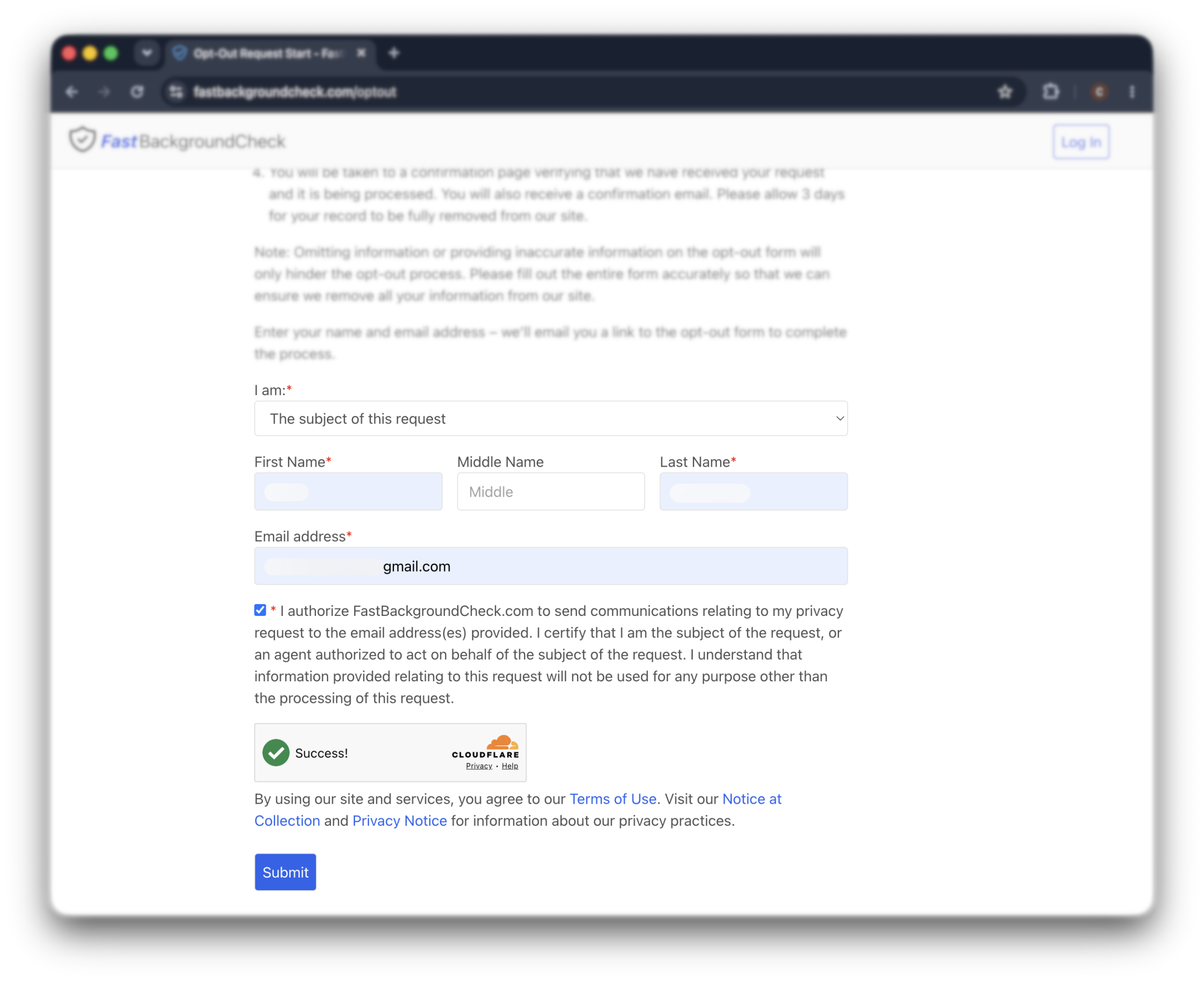
In the “I am” dropdown, choose “the subject of this request”.
Then enter your first and last name and your email address. Middle name is optional.
Tick the authorization checkbox, solve the Cloudflare check (it flips to a green “success!”), and click “submit”.
A masked or throwaway email works fine—you only need it to receive one link.
-
Step 3. Click the link in your email
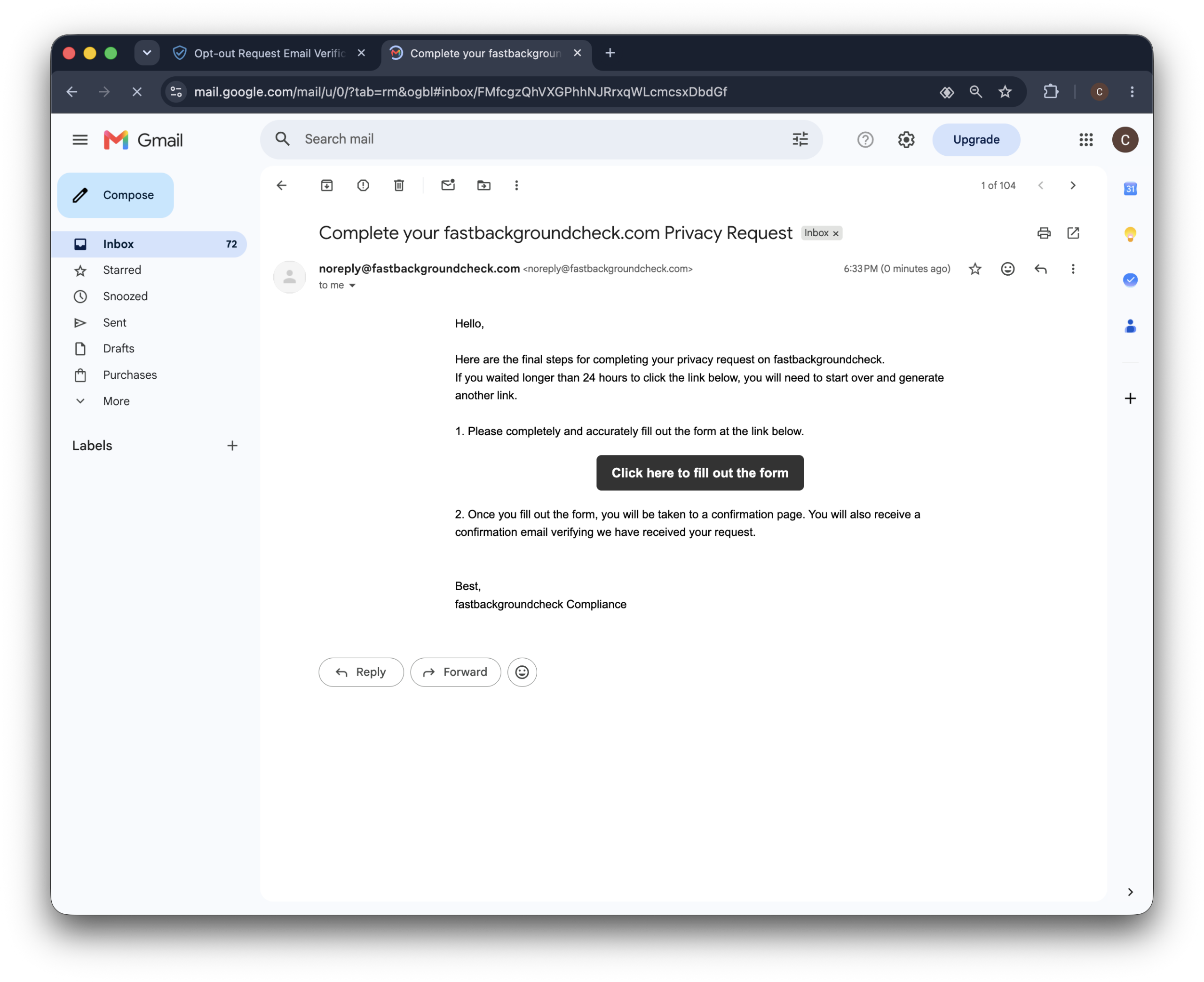
FastBackgroundCheck sends an email from [email protected] titled “Complete your fastbackgroundcheck.com privacy request”.
Open it and click “click here to fill out the form”.
Do this within 24 hours. If the link expires, just start over from Step 1. If the email isn’t in your inbox, check your spam folder.
-
Step 4. Fill out the removal form
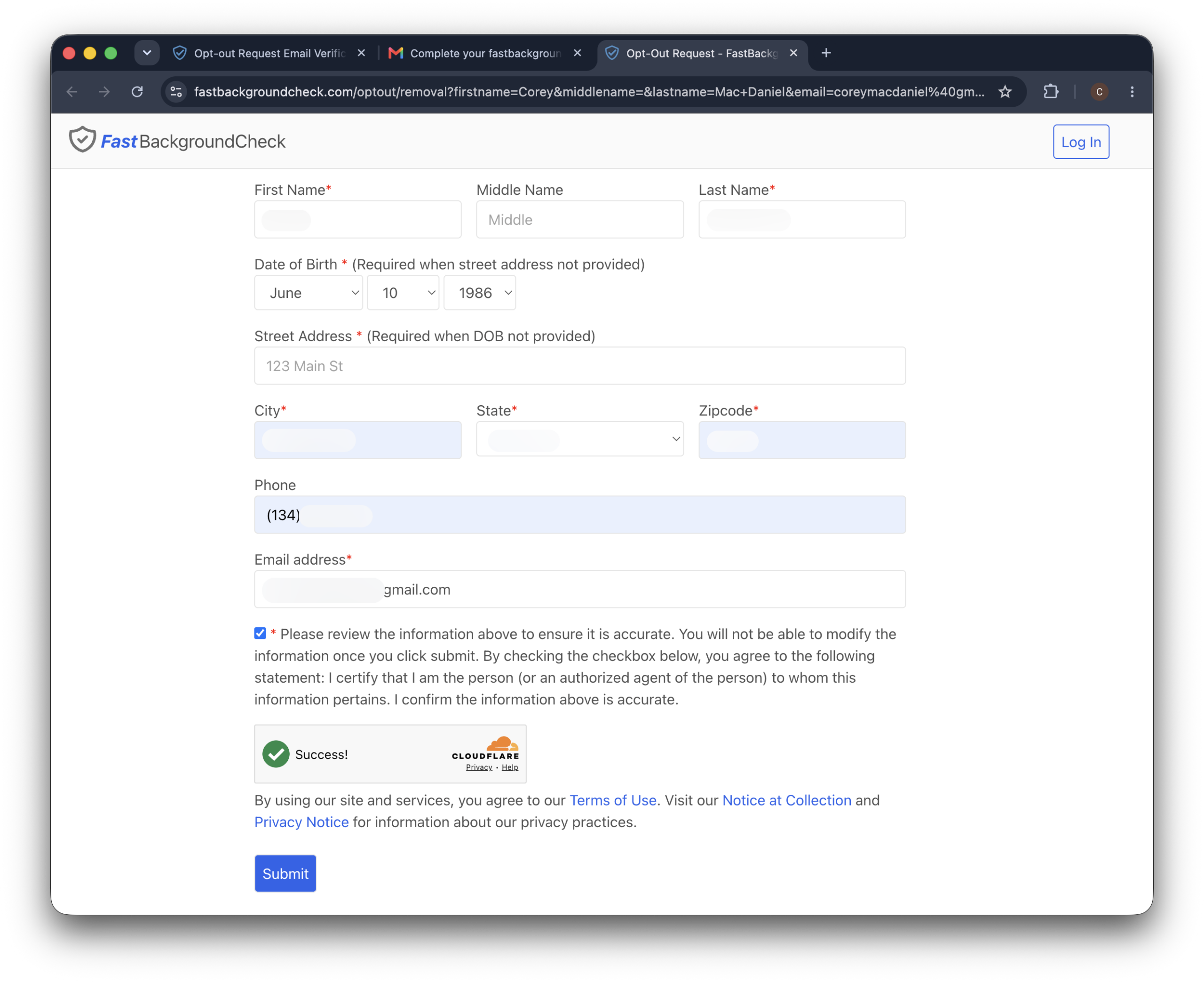
The link opens the actual removal form, with your name and email already filled in.
Now add the details that identify your record.
The form needs either your date of birth or your street address—one is required whenever the other is left blank.
Fill in whichever matches your listing, along with your city, state, and zip code. Phone number is required too.
Important: Use the details as they appear on your FastBackgroundCheck listing, not just your current ones. If your record shows an old address, that’s the one that will match.
-
Step 5. Review and submit
Tick the accuracy checkbox to confirm the details are correct and that you’re the subject of the request. You can’t edit anything after this, so check it over first.
Solve the second Cloudflare check and click “submit”.
You’ll land on a confirmation page, and a confirmation email follows.
That’s the whole process—nothing else to do.
Alternative opt-out methods
If the online form won’t work, FastBackgroundCheck also takes removal requests by phone, by mail, or through its contact form.
Opt out by phone
Call FastBackgroundCheck at (888) 747-4094 and ask to have your record removed.
Be ready to give the representative enough personal details to find your listing—name, address, date of birth, and so on—since they can’t remove what they can’t locate.
Ask by email
You can also use the contact form at fastbackgroundcheck.com/contact, or write to [email protected].
Subject: Personal information removal request
Hello, I am requesting that you remove my personal information from FastBackgroundCheck.
My listing is here: [listing URL].
My details are: [your full name], [date of birth or street address], [city, state, zip], [any phone or email shown on the listing].
Please confirm once my record has been removed.
Thanks, [your full name]
Keep the confirmation you get back—it’s useful proof if the listing ever comes back and you need to follow up.
What to expect after opting out
FastBackgroundCheck asks you to allow about 3 days after you submit the removal form. If it’s been longer, remember that data brokers are legally allowed up to 45 days, so a short wait isn’t a sign anything went wrong.
How to verify your data was removed
After a few days, search your name on the site again. If your listing is gone, you’re done. A private browser window gives you a cleaner result, since it ignores anything cached from your earlier visit—and clearing your cache helps if the old page lingers.
Will your data come back?
It can. FastBackgroundCheck keeps pulling from public records and telecom data, so a new record with your details can show up months down the line. That’s normal for this kind of site—it’s not that your opt-out failed, it’s that a fresh record slipped in.
Troubleshooting
In short:
Most FastBackgroundCheck opt-out problems come down to a missing or expired email link, or a removal form that won’t accept your details. Every one has a straightforward fix, and if a record shows up again, just re-run the opt-out.
The email never arrived
Check your spam and promotions folders first. If it’s not there after 15 minutes, start the request again from the opt-out page—a small typo in your email address is the usual culprit. Adding fastbackgroundcheck.com to your safe-senders list before you retry can help it land.
The link expired
The link only lives for 24 hours. If yours has expired, there’s no way to revive it—just run the request again from Step 1 and click the new link right away.
The removal form won’t accept your details
The form needs either your date of birth or your street address—if you leave both blank, it won’t go through. Fill in at least one, plus your city, state, and zip. If it still can’t find a match, try the address or birth date exactly as they appear on your listing rather than your current details.
Your data reappeared after removal
Run the opt-out again from the start. A reappearance means a fresh record was added, not that your original request was ignored. If this keeps happening, an automated removal service that monitors and re-submits for you will save you the repeat trips.
Other brokers that may have your data
FastBackgroundCheck is one of dozens of people search sites pulling from the same public records.
If your details are here, they’re almost certainly on Advanced Background Checks, CheckPeople, Fast People Search, and USPhoneBook too—and several of those run the exact same email-first opt-out, so you’ll recognize the steps.
Here’s the honest catch, though:
Even a clean removal from every one of them tends to expire.
These sites re-scrape public records on a rolling cycle, so your listing creeps back from a fresh source a few months down the line.
If keeping up with all of them sounds like a lot, that’s the kind of thing Incogni is built for.
Instead of you tracking each site by hand, it sends opt-out requests to the data brokers it covers, watches for your info reappearing, and re-sends the requests when it does.
FAQ
Can FastBackgroundCheck get my data again after I opt out?
Yes, it is possible for FastBackgroundCheck to collect your information again after you have already opted out. This can happen especially when any significant data such as your name, address, or phone number has changed and they cannot match the new data to your old record.
To keep your data private, we recommend checking these websites again periodically, especially after making any of the changes above. While this can be time-consuming and tedious, we believe your privacy and security are well worth it!
If you don’t have the time to do this yourself, try our fully automated data removal service.
Where does FastBackgroundCheck get its data?
Like most data brokers, FastBackgroundCheck gets personal information by scraping the internet. They use public records, social media sites, businesses, and other data brokers as sources of information.
Related: How to deal with incorrect information on background check reports
Is FastbackgroundCheck legal?
Yes, FastBackgroundCheck is completely legal. However, it is not FCRA compliant. This means that the information on this website cannot be used for credit, employment, or tenancy screenings. It does, however, operate under data privacy laws such as the GDPR and CCPA.
Residents under the jurisdiction of these laws have the right to make websites like FastBackgroundCheck delete their personal information.
How do I opt out of background checks in general?
Opting out of FastBackgroundCheck only removes your listing from that one site. It has no effect on official employment or tenant background checks, which run through regulated screening companies. Removing yourself from people-search sites is about limiting casual public exposure, not those formal checks.