LexisNexis Opt Out & Data Removal Guide
LexisNexis makes it difficult to opt out. It’s one of the hardest data brokers to clear, and the full public-records suppression is gated behind strict eligibility.
Mainly because finding the removal form can be tricky—but once you’re in the right place, it only takes a few clicks. Let’s walk through the process and remove your data from LexisNexis, step by step.

Updated on: 04 August, 2026
Opt-out process:
10–15 minutes
Removal time:
up to 30 days
Requirements:
name, address, date of birth; SSN or driver’s license optional but recommended; documentation for restricted-records suppression
Cost:
free
ℹ️ In May 2025, data broker LexisNexis disclosed a data breach exposing personal info of over 364,000 people including names, SSNs, and emails. This shows it’s not just about data being sold. Leaks happen too. Opting out limits what can be exposed next time.
Note: LexisNexis isn’t included in automated removal, but Unlimited Plan users can submit a quick custom request—our privacy experts will take care of the rest.
Table of contents
What LexisNexis is and why it’s different
Most data brokers feed people search sites.
LexisNexis feeds the institutions that decide things about your life.
Its files shape insurance quotes, loan approvals, background checks, and identity verification. That’s why the data runs deep, and why it gathers from public records, property records, court records, and commercial sources to power its risk products.
Here’s the catch—
LexisNexis splits its opt-outs into separate buckets, and they don’t all work the same way.
→ Anyone can opt out of direct marketing and prescreen credit offers.
→ But the big one—suppressing your public-records—is reserved for a narrow group.
So before you start, know which door you’re walking through.
The two opt-out paths, explained
Two paths, different rules.
1) Path one—the consumer portal.
This is where you opt out of direct marketing and firm offers of credit and insurance. No eligibility test, no documents. It also hosts the public-safety opt-out for restricted records, which does require proof.
2) Path two—the suppression form.
This targets LexisNexis’s restricted public-records products, the ones sold to credentialed commercial and government subscribers. This is the one with the eligibility wall.
Pick the path that matches what you’re after, and you’ll skip a lot of wasted clicks.
How to opt out of LexisNexis step by step
How to opt out of LexisNexis step by step
-
Open the opt-out request form
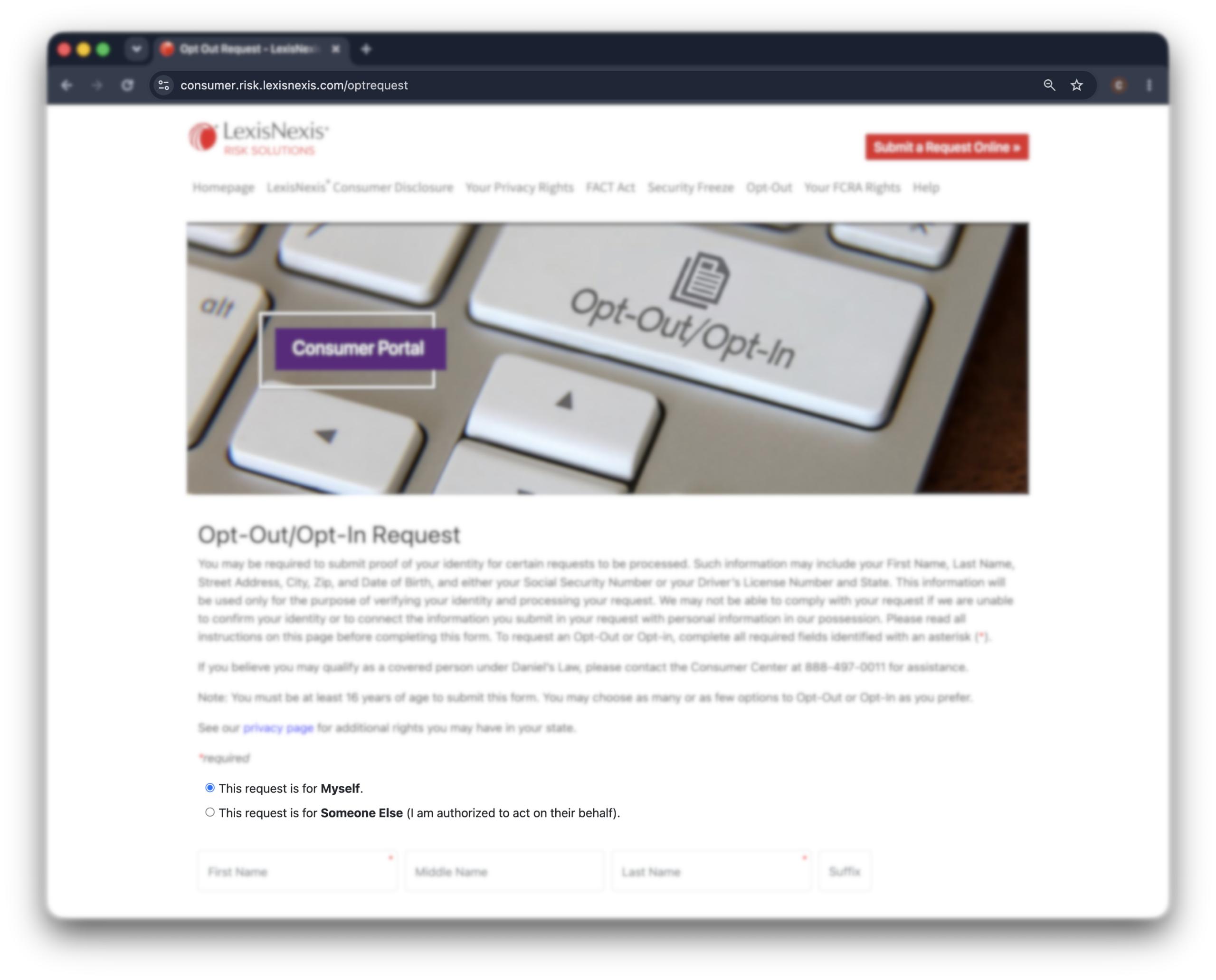
Go to consumer.risk.lexisnexis.com/optrequest.
This is the LexisNexis Risk Solutions consumer portal—the official place to file an opt-out.
You’ll see the request defaults to “myself.”
Leave it there unless you’re filing for a minor child or someone you’re legally authorized to represent.
-
Enter your identifying information
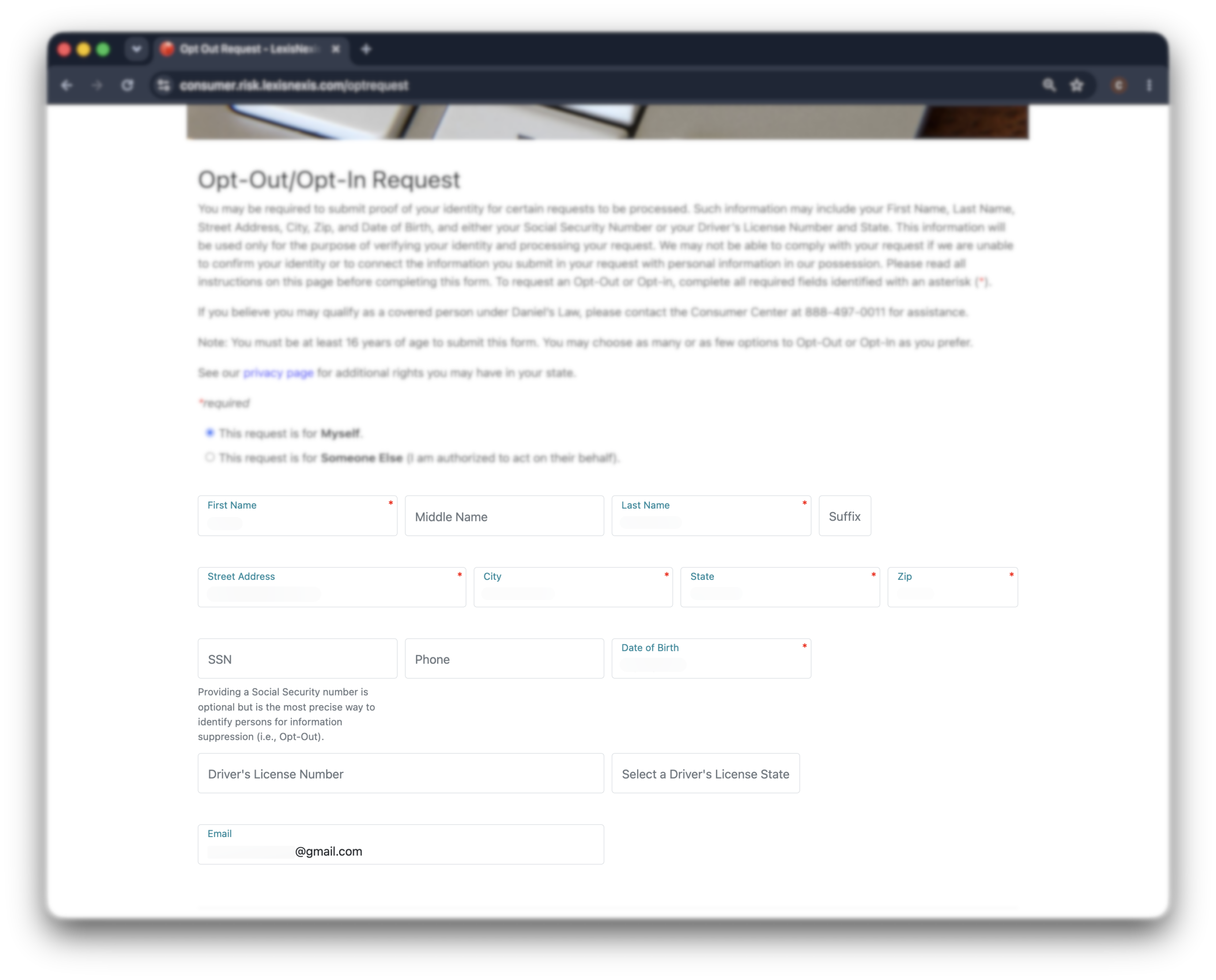
Fill in your first name, last name, street address, city, state, and zip. Add your date of birth and a contact email.
There’s an SSN field.
It’s optional—but the form says it plainly: a Social Security number is the most precise way to match your records for suppression.
If you’d rather not, a driver’s license number and state works as an alternative.
You don’t need that level of precision.
-
Choose your opt-outs
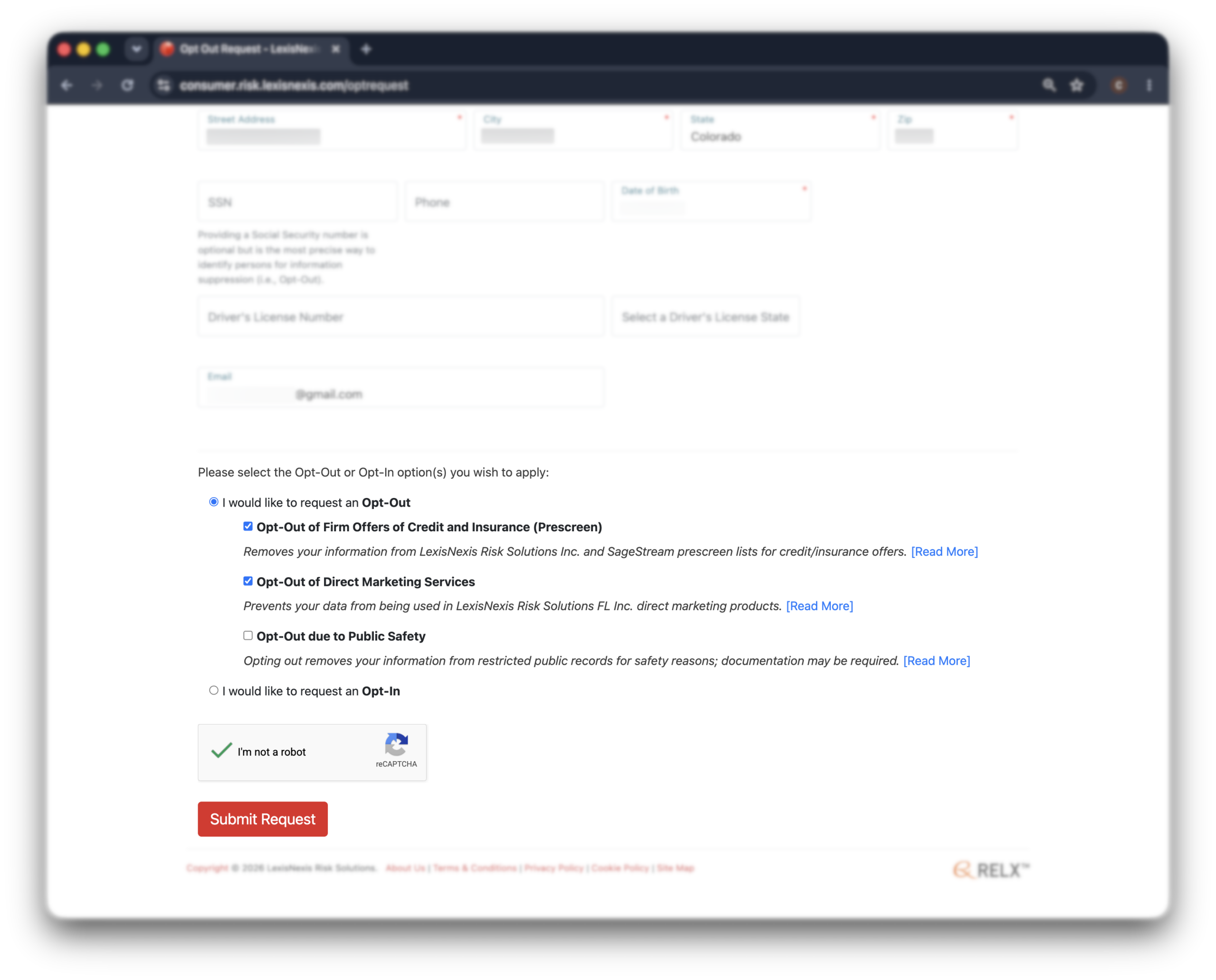
Now pick what you’re opting out of. The portal offers three options under “I would like to request an opt-out”:
“Opt-out of firm offers of credit and insurance (prescreen)”—pulls you off the lists LexisNexis and SageStream sell to lenders and insurers for unsolicited offers.
“Opt-out of direct marketing services”—stops your data from being used in LexisNexis direct marketing products.
“Opt-out due to public safety”—suppresses your info from restricted public-records products. This one needs documentation.
Check as many as apply. The first two are open to everyone.
-
Handle the public-safety reason (if it applies)
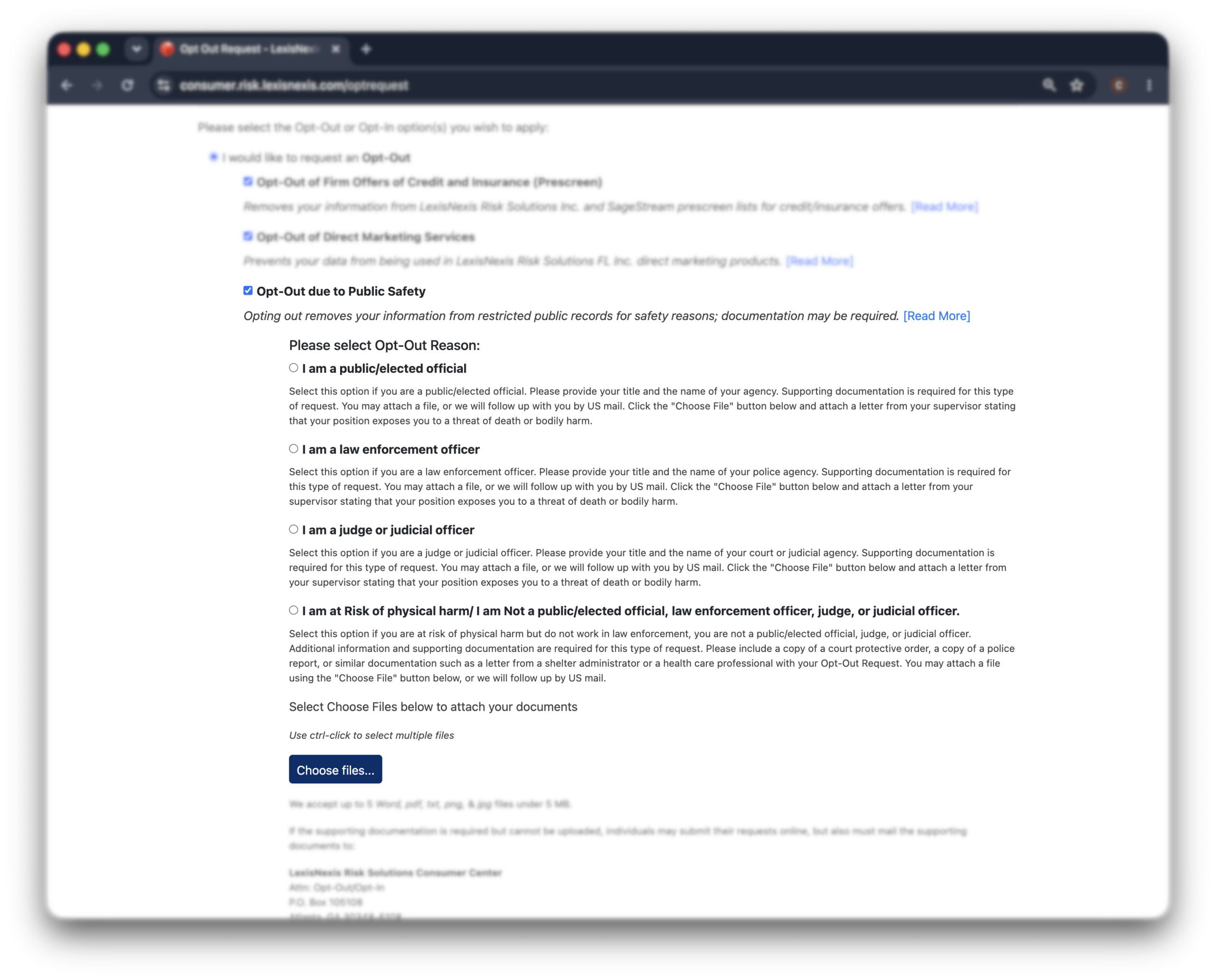
If you select “opt-out due to public safety,” the form asks why.
You’ll choose from public/elected official, law enforcement officer, judge or judicial officer, or at risk of physical harm. Each requires proof:
Public official, law enforcement, or judge: a supervisor’s letter stating your position exposes you to a threat of death or bodily harm.
At risk but not an official: a court protective order, a police report, or a letter from a shelter administrator or health care professional.
You can upload the file directly (Word, PDF, txt, png, or jpg, up to 5 files under 5 MB each). If you can’t upload, submit online and mail your documents to the Consumer Center.
-
Submit and save your confirmation
Click “submit request.”
You’ll see an on-screen confirmation that your request is received and under review.
Note the date and keep a screenshot. With a broker this slow and this large, a paper trail matters if you need to follow up.
Suppressing your full public-records file
This is the suppression most people actually want—and the hardest to get.
The eligibility is narrow. LexisNexis suppresses restricted public-records data for:
People at risk of physical harm—submit a court protective order, police report, or similar documentation.
Identity theft victims—submit a police report or proof like a letter from your credit card company, plus an identity theft affidavit.
Law enforcement officers and public officials—submit a supervisor’s letter confirming your role exposes you to harm.
What to expect after opting out
The data-removal procedure we presentedPatience is part of the process here.
Where a people search site clears a listing in days, LexisNexis gives itself up to 30 days.
Documentation-based suppressions can run on the longer end of that.
Now, for the bitter part—
Suppressing your file can complicate identity verification.
Banks, lenders, insurers, and government agencies sometimes confirm your identity against LexisNexis data.
With your file suppressed, those checks may stall or ask for extra steps when you apply for a loan, open an account, or interact with an agency.
It’s usually temporary friction, not a wall.
But it’s worth knowing before you suppress everything.
Troubleshooting a denied request
In short: If LexisNexis denies your suppression request, it’s almost always because you don’t meet the strict eligibility for restricted public-records products.
Denied? Here’s what’s likely going on.
A denial almost always means you didn’t fit one of the qualifying categories—identity theft victim, public official, or someone facing a documented risk of harm.
LexisNexis declines that specific request and tells you so.
But you’re not out of options:
- Finish the open opt-outs: Direct marketing and prescreen credit/insurance offers are available to everyone through the consumer portal. Do those even if the public-records suppression is off the table.
- Request a security freeze: Depending on your state, you can freeze certain LexisNexis-maintained reports, like C.L.U.E., Current Carrier, and Riskview. Note this isn’t a credit freeze—LexisNexis isn’t a credit bureau—so freezing your actual credit file still means contacting Equifax, Experian, and TransUnion.
- Order your file disclosure: Use LexisNexis’s full file disclosure request to see exactly what they have on you. It’s useful for catching errors and deciding your next move.
Other brokers that still have your data
LexisNexis isn’t the only place your data lives.
There’s a short list of credit and risk bureaus like Equifax, Experian, TransUnion, and SageStream.
Each runs its own opt-out, and like LexisNexis, you handle them yourself. But here’s the good news: their databases can’t be Googled. They’re regulated, used only for official decisions, so your data is relatively safe there.
The bigger exposure is people-search sites.
That’s where Incogni helps: it sends removal requests across 420+ data brokers and people-search sites, then re-submits them every 30 to 60 days as your data reappears.
It can’t reach LexisNexis or the credit bureaus, but it takes the loud, public layer off your plate.
FAQ
Can LexisNexis add my information again, even after they suppress my data?
Yes, your data might reappear on their website after some time. This can happen if new data they collect doesn’t match the records they previously removed, something that’s common among many data brokers.
Does the LexisNexis opt-out actually work?
Yes, within limits. The direct marketing and prescreen opt-outs work for everyone, and the public-records suppression works if you qualify and submit valid proof. It clears LexisNexis-owned databases only—it won’t remove the underlying public records or stop other brokers from collecting them.
How did LexisNexis get my information?
LexisNexis builds its files from public records, property deeds, court records, and commercial data sources, then packages that information into risk products. It’s gathering data, not collecting it from you directly, which is why so much of it is there before you’ve ever heard of the company.
Does LexisNexis affect credit scores?
LexisNexis isn’t a credit bureau and doesn’t calculate your credit score, but its data feeds risk decisions like insurance quotes and identity checks. Opting out won’t change your credit score, and freezing your actual credit still means contacting Equifax, Experian, and TransUnion directly.
Do background checks use LexisNexis?
Yes—LexisNexis data is widely used in screening and verification. Note that LexisNexis won’t suppress data from FCRA-regulated products, so an official, compliant background check can still surface your records even after you opt out elsewhere.