How to opt out of TruePeopleSearch and remove your listing
Type your name into TruePeopleSearch and there it is—your home address, served up to anyone who looks, for free. The good news? Getting your record off the site takes just three steps and a few minutes, and you don’t even need an account. Here’s how to do it.

Updated on: 04 August, 2026
Opt-out process:
about 5 to 10 minutes to submit
Removal time:
not stated by TruePeopleSearch for this form, but expect a wait of at least a few days
Requirements:
a working email address
Cost:
free
This guide is part of Incogni’s free educational resources.
Prefer to skip the manual work? Incogni covers 420+ data brokers, including TruePeopleSearch. It sends the opt-out requests for you and keeps re-sending them when your data reappears.
🛡️ 30-day money-back guarantee
The process starts with your email, not your listing. TruePeopleSearch needs to verify who you are before it shows you the full opt-out form.
TruePeopleSearch removal, step by step
-
Go to the removal page and submit your details
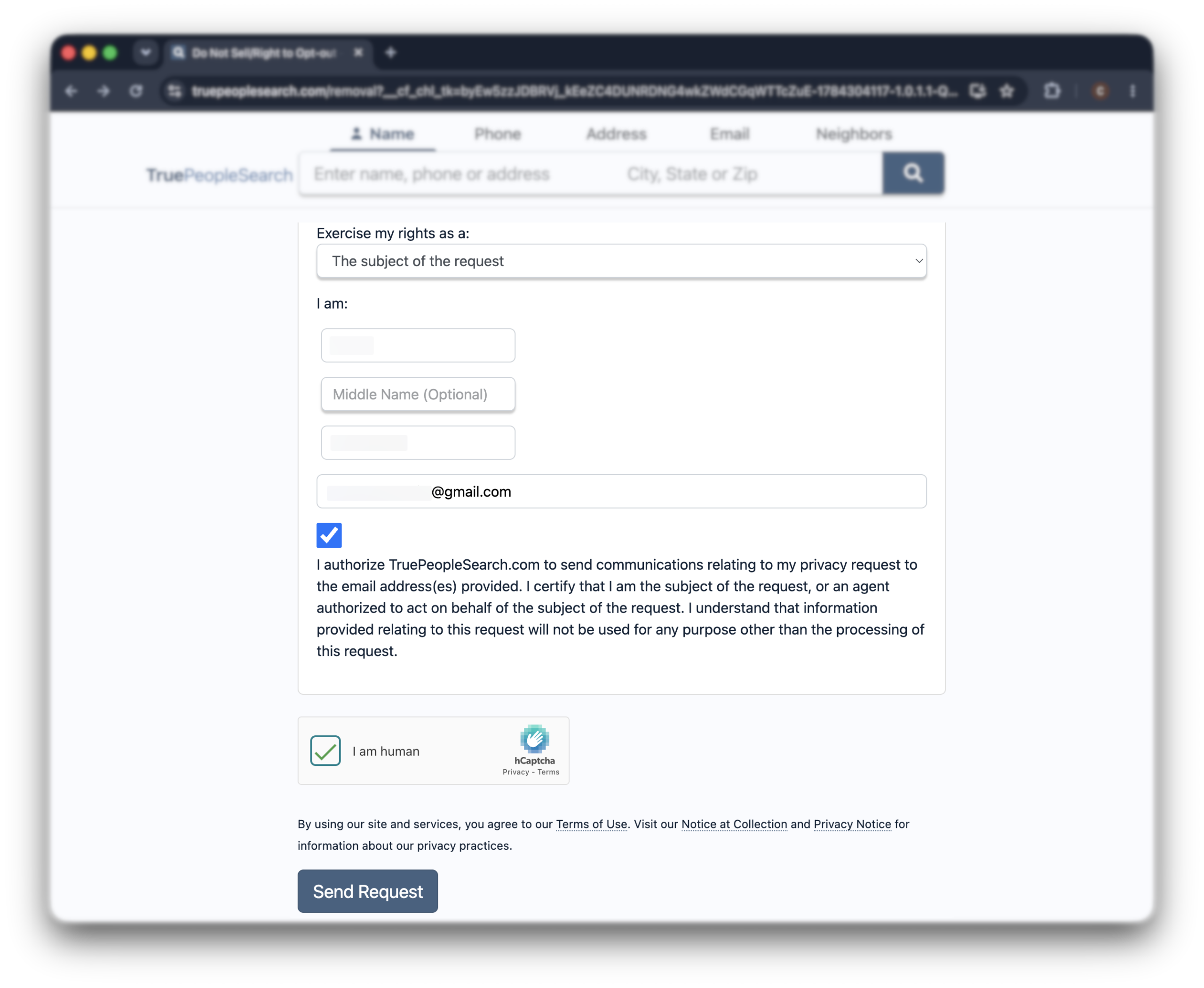
Go straight to truepeoplesearch.com/removal.
You can also get there from the homepage: scroll to the bottom and click “do not sell my personal information”, but that link only shows up on the homepage, so the direct URL is faster.
On the form, choose “the subject of the request” from the dropdown, then enter your full name and an email you can open right now. Agree to receive opt-out communications and clear the CAPTCHA.
Once your details are in, click “send request” to submit. TruePeopleSearch will email you a link to the full opt-out form.
Use an inbox you can open right away. The rest of the process depends on that email arriving.
-
Click the link in your email
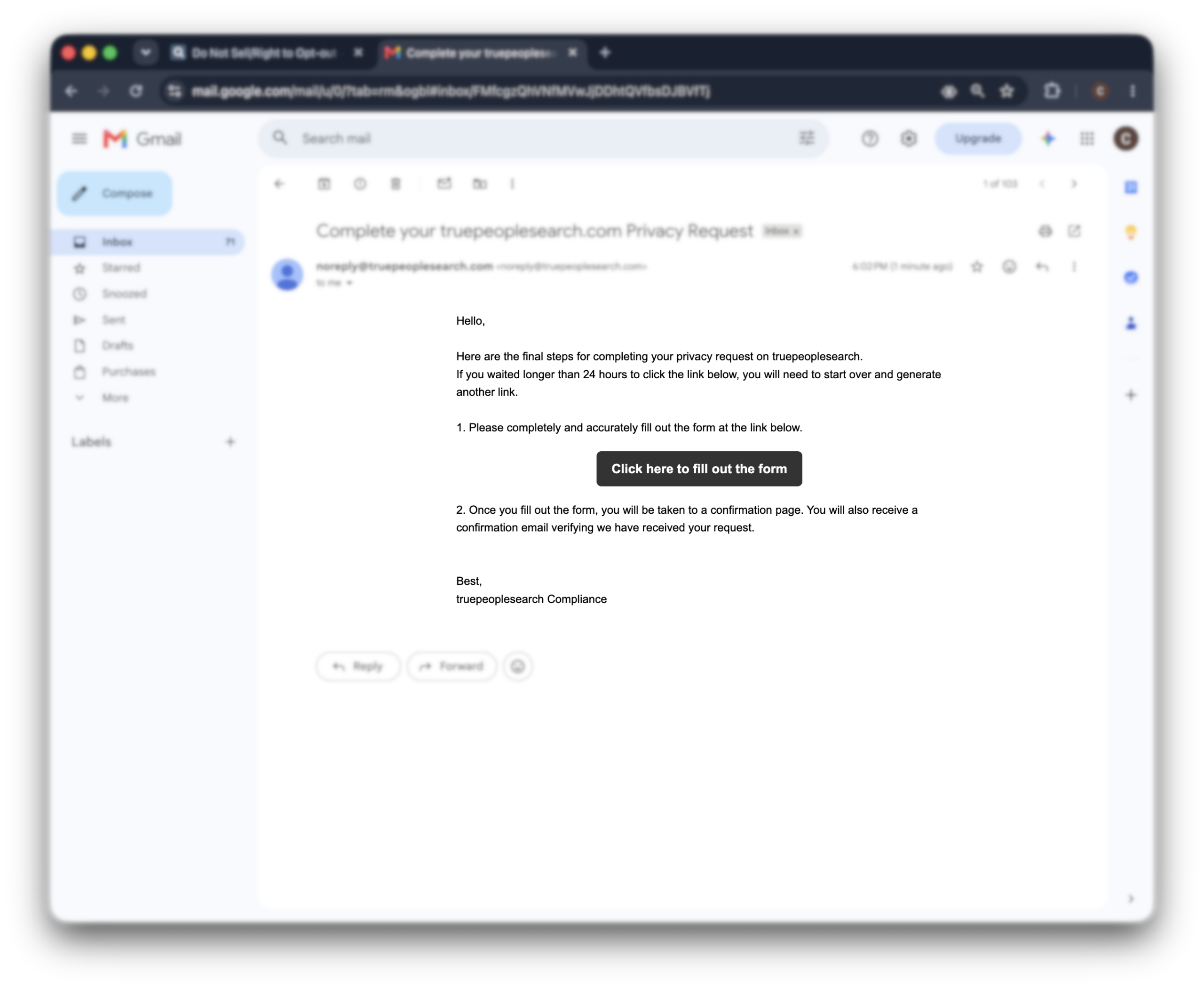
Open the email TruePeopleSearch sends you and click the link inside. It takes you to the full opt-out form.
This part matters: the link expires after 24 hours. If you wait longer than that, you’ll need to start over from Step 1.
-
Complete the opt-out form and submit
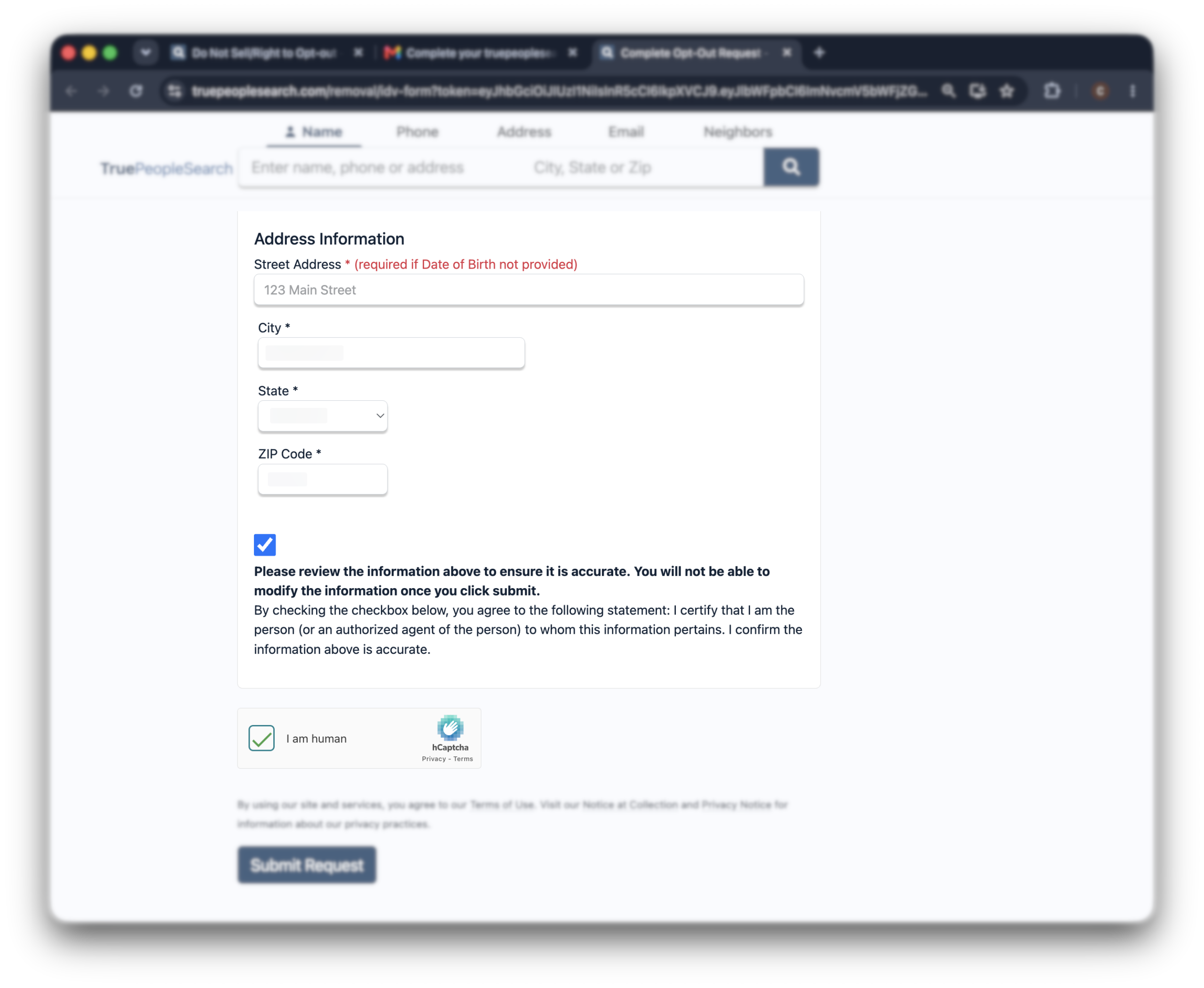
Fill out the form with your details, matching what appears on the listing you want removed. The more accurate the details, the easier it is for them to find and remove the right record.
Once you submit, you’ll see a confirmation on screen, and a confirmation email will follow. You’ll get one more email once your request has been fully processed.
Alternative opt-out methods
In short: If the web form keeps glitching or the CAPTCHA won’t cooperate, you can fall back on a privacy request by email or mail under laws like the CCPA.
The form is the fast way. But if it keeps throwing CAPTCHAs or the email never lands, you’ve got a backup.
If your state gives you a right to delete—California’s CCPA is the widest—you can email TruePeopleSearch a privacy request and tell them to delete your data.
Put it in writing, name the listing, keep a copy.
Slower than the form, but it leaves a paper trail.
One thing to be clear about—
TruePeopleSearch treats your listing as public-records data, which sits outside most state privacy laws.
So it honors a deletion request as a courtesy, not a legal obligation, and your data can resurface later from fresh records.
Not sure what to write? Copy this and fill in the brackets:
Subject: Request to delete my personal information
Hello,
Please delete my personal information from TruePeopleSearch and stop selling or sharing it. Here’s the listing:
Name: [your full name]
Listing URL: [paste the link to your TruePeopleSearch profile]
City/State: [your city and state]
Phone on the listing: [phone shown on the profile]
[If you’re in a state with a deletion right, add one line:]
I’m exercising my right to delete under [California’s CCPA / your state’s privacy law].
Please confirm in writing once it’s removed.
Send it from an email you control, and hold onto a copy—that’s your proof if the listing lingers or comes back.
What to expect after opting out
It’s usually faster than 72 hours. But don’t assume—search your name on the site again after a day or two to confirm the listing’s actually gone.
One thing the opt-out won’t do is clear Google.
Your old listing can hang around in search results from Google’s cache after it’s gone from the site itself.
That clears on its own as Google re-crawls the page.
In a hurry?
You can ask Google to drop the outdated page through its own cache-removal tool.
Troubleshooting
Most removals go through clean. When one doesn’t, here’s how to fix it.
Clicking “submit” does nothing?
This is usually a browser issue, not a problem with your request. Try switching to a different browser, like Chrome or Firefox, or clear your current browser’s cookies and cache, then go back to truepeoplesearch.com/removal and start the form over.
No confirmation email?
It usually lands within minutes, so check your spam folder first. If it’s still missing after an hour, the link may have expired—start the removal again and watch for the new email. The link only stays live for a short window, so confirm the same day.
Listing still there after 72 hours?
Search your name on the site again to be sure it didn’t already drop. If it’s genuinely still up, file the request again, or use one of the channels in the section above—the privacy rights page, the phone line, or email—and keep a copy.
Listing came back later?
That’s normal. TruePeopleSearch pulls from public records, so a fresh source can put you back up weeks or months on. Re-check every few months and remove it again.
More than one listing?
TruePeopleSearch often groups family members together, so one search can show several profiles—yours and your relatives’. Each is a separate removal, but you can use the same email for all of them. Do them one at a time and confirm each.
Other sites that have the same data
If you don’t feel like going through the official Clearing TruePeopleSearch doesn’t clear the rest.
FastPeopleSearch, Nuwber, and a long list of look-alikes scrape the same public records and rebuild the same profile.
Same data, different domain, separate form.
And here’s the part that wears people down—they re-list you. Pull your data off one site today, and it can be back next month from a fresh source.
So here’s the faster way—let others handle it for you.
Incogni sends removal requests across 420+ data brokers and people search sites, then re-submits them every 30 to 60 days as your data reappears.
You take down the one in front of you; it keeps the rest from creeping back.
FAQ
Does true people search removal process work?
Yes. The form is reliable and free, and there’s no identity check beyond confirming your email. Just remember it only clears the listing you submit, so hunt down any duplicates.
How does True People Search get your information?
It scrapes it—automatically—from public records, social media, and commercial databases, then bundles it into one profile. You never handed it anything. It pulled your details from sources already out there.
Will True People Search collect my data again after I opt out?
Yes, TruePeopleSearch may collect your data again after you opt out. Their Privacy Notice (dated January 1, 2025) states they regularly receive new public records, so your information from sources like property deeds or court files could reappear. They recommend periodically refreshing your opt-out request at https://www.truepeoplesearch.com/removalc
Is True People Search legit?
Yes, TruePeopleSearch is a legitimate data broker operating since 2017, offering free people searches using public records like property deeds and court files. Its Privacy Notice (2025) details legal data collection and CCPA compliance (217,243 opt-outs in 2020). However, data accuracy varies, and opt-outs may need periodic renewal.
But why is a website like True People Search legal?
True People Search is legal because it uses public records and complies with laws like the Fair Credit Reporting Act (FCRA). They just organize info that’s already legally available. True People Search can’t legally sell your info for credit, insurance, or employment decisions.
Can you use the same email address to opt out multiple names on True People Search?
Yes, on True People Search you can use the same email to opt out multiple listings. You must submit each removal separately and verify each one through a confirmation email. Check your spam folder if you don’t see the emails.
Why TruePeopleSearch is worth removing first
Here’s the deal—most sites make you pay to see the good stuff.
This one doesn’t.
A stalker, an angry ex, a scammer working an angle—none of them need a credit card to find where you live and who you live with. They just need your name. So clear this one early, then work down the list.